
Support by service : Frequently Asked Questions about Arcstar Universal One Virtual
Service menu support information


 Service menu support information
About the necessary information when the connection to vApp(MacOS) is not available.
[A] Information about the OS
Please let us know Mac OS version which is installed vApp(MacOS).
[B] The log which shows network information of your device
1. Open application, vApp(MacOS).
2. Connect vApp to virtual network.
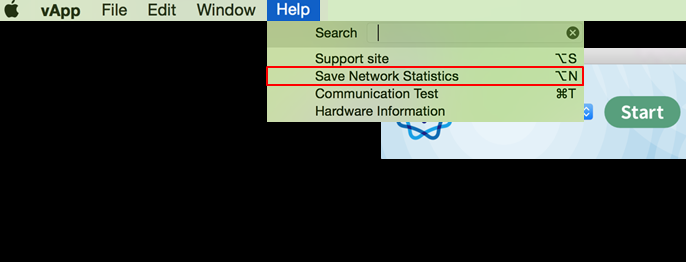
3. Click "Save Network Statistics" in the "Help" on Menu bar.
*This procedure is necessary regardless of the result of connection to virtual network.
[C] The log at the time of being connected
1. Open application, vApp(MacOS).
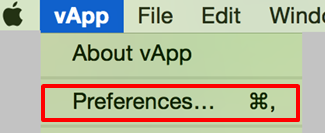
2. Click "Preferences" in the "vApp" on Menu bar.
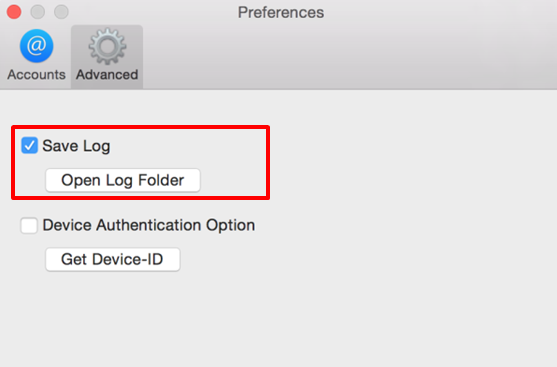
3. Select "Save Log" in the "Advanced" tab.
4. Connect vApp to virtual network.
5. The logs will be created to log folder, so please click to "Open Log Folder" in "Advanced" tab.
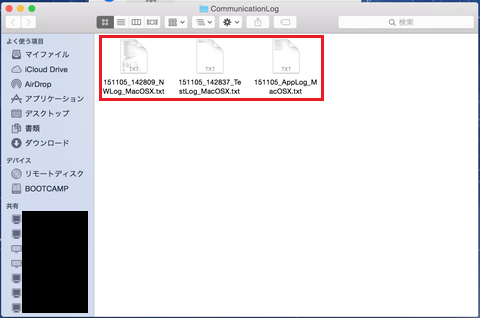
6. Open the folder and display the acquired logs, so please obtain them.
*This procedure is necessary regardless of the result of connection to virtual network.
[B] yymmdd_hhmmss_NWLog_MacOSX.txt
[C] yymmdd_AppLog_MacOSX.txt
Your cooperation will be highly appreciated.